Win11Debloat

Remove Bloatware from Windows

A free, open-source PowerShell script that strips out preinstalled apps, telemetry, ads and suggestions - and turns off Copilot & Recall. No installation, fully reversible.
Download Win11DebloatHow to run it
Free & open source Reversible Windows 10 & 11
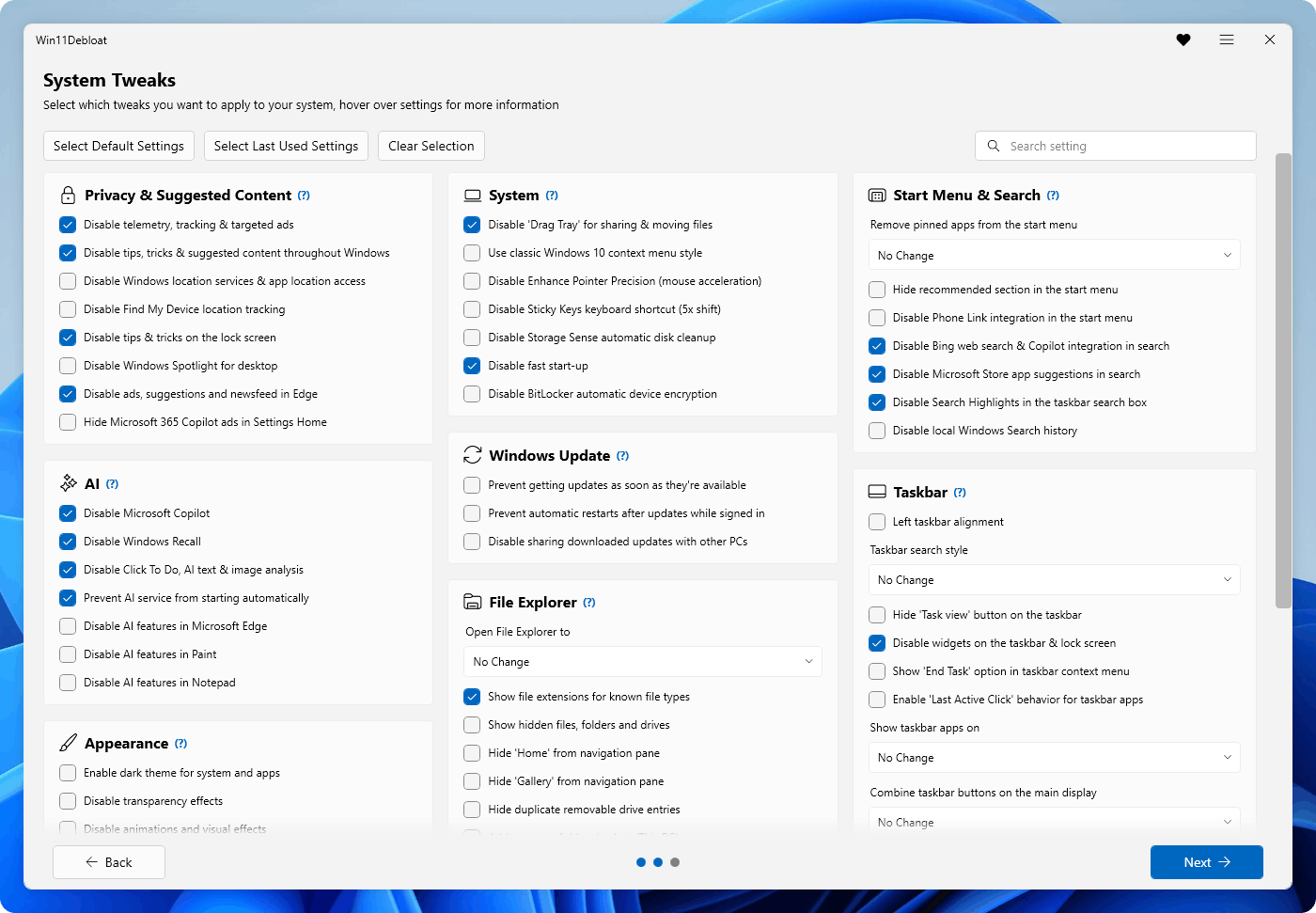
Win11Debloat GUI showing the System Tweaks selection screen with Privacy, AI, System, Windows Update, File Explorer, Start Menu and Taskbar categories

Built to be trusted, not just fast

Every change is public, optional and reversible - you stay in control of your own machine.

Open source & transparent

Every change the script makes is public on GitHub. No black-box "optimizer", nothing hidden - review the code before you run it.

Reversible & in your control

An interactive menu lets you choose exactly what to change. Most tweaks can be undone, and removed apps reinstall from the Microsoft Store.

No install, lightweight

Win11Debloat is a PowerShell script, not an app. Run it, clean your system, and you're done - nothing stays installed in the background.

Run the debloater in two minutes

Pick the method that suits you - the interactive menu lets you choose exactly which tweaks to apply.

A

Download & run

  1. Download the Win11Debloat script (Get.ps1).
  2. Right-click it → "Run with PowerShell" (as administrator).
  3. Pick the tweaks you want from the menu and apply.
Download the script
B

One-line PowerShell

  1. Open PowerShell or Terminal as administrator.
  2. Paste the command below and press Enter.
PowerShell
& ([scriptblock]::Create((irm "https://debloat.raphi.re/")))

Administrator mode is recommended - many system-level changes need elevated permissions.

What it cleans and disables

Everything is grouped into clear categories - remove only the clutter you don't want and keep Windows familiar.

Remove preinstalled apps

Uninstall bundled and promotional apps you never asked for in a single pass.

Privacy & suggested content

Disable telemetry, activity tracking, targeted ads, tips and suggested content.

AI: Copilot & Recall

Remove Microsoft Copilot, disable Windows Recall and other AI features.

System tweaks

Restore the classic context menu, turn off Fast Startup, and tame other defaults.

Windows Update

Reduce aggressive update behavior and stop automatic restarts while you work.

File Explorer

Show file extensions and hidden items, and bring back a cleaner Explorer.

Start menu & search

Remove web results, promoted apps and Bing/Copilot integration from search.

Taskbar

Declutter the taskbar: remove widgets, chat and search box noise.

See the full list of tweaks in the Wiki →

For everyday users, power users & IT admins

Everyday users

Open the interactive menu, pick the changes you want, and clean up a new PC without touching Group Policy or the Registry.

Power users

Run specific options straight from PowerShell and apply the same clean setup every time you reinstall Windows.

IT administrators

Use command-line parameters, apply changes to other users, and standardize images with Audit Mode and Sysprep workflows.

Frequently asked questions

Is Win11Debloat an app?

Win11Debloat is a PowerShell script, not a traditional application. There is no installer and nothing is added to your system permanently - you run it, apply the changes you want, and you are done.

Does Win11Debloat work on Windows 11?

Yes. Win11Debloat fully supports Windows 11.

Does Win11Debloat work on Windows 10?

Yes. Win11Debloat works on Windows 10 as well as Windows 11.

Does Win11Debloat require administrator permissions?

Administrator mode is recommended. Many system-level changes need elevated permissions to apply correctly, so it is best to run PowerShell as administrator.

Can the changes be reverted?

Yes. Win11Debloat is designed with reversibility in mind. Most changes can be reverted, and almost all removed apps can be reinstalled from the Microsoft Store.

Can removed apps be installed again?

Almost all removed apps can be reinstalled from the Microsoft Store whenever you need them.

Does Win11Debloat improve performance?

Win11Debloat is primarily a cleanup, privacy and customization tool. Removing unwanted apps and disabling background features can make Windows feel cleaner and less distracting, but it should not be treated as a guaranteed performance booster.

Does Win11Debloat disable telemetry?

Yes. It includes options to disable telemetry, diagnostic data, activity history, app-launch tracking, targeted ads and other tracking or personalization features.

Can Win11Debloat disable Microsoft Copilot?

Yes. Win11Debloat includes options to disable and remove Microsoft Copilot.

Can Win11Debloat disable Windows Recall?

Yes. It can disable Windows Recall and related AI features such as Click to Do.

Can Win11Debloat remove ads from Windows?

It can disable many ads, suggestions, tips, Spotlight promotions, Microsoft 365 prompts, Edge suggestions, MSN feed content, Start menu suggestions and search highlights.

Is Win11Debloat safe?

Great care has gone into preventing unintentional breakage of core Windows features, but any tool that modifies system settings carries some risk. Review the options, understand what will change, and use a backup or restore point when appropriate.

Is Win11Debloat open source?

Yes. Win11Debloat is open source and available on GitHub under the MIT license, so anyone can review the code before running it.

Is Win11Debloat free?

Yes. Win11Debloat is completely free and open source.

Does Win11Debloat install background services?

No. It is a PowerShell script and does not install a background service or leave a permanent app behind.

Can Win11Debloat be used by system administrators?

Yes. It includes command-line support, the ability to apply changes to other users, Windows Audit Mode support and a Sysprep mode for configuring the Default user profile.

Can Win11Debloat be automated?

Yes. Advanced users and administrators can use command-line parameters to automate the selected changes across multiple machines.

Does Win11Debloat remove OneDrive?

Win11Debloat includes File Explorer and navigation cleanup options related to OneDrive. Review the available app removal and configuration options before applying changes.

Can Win11Debloat change the Start menu?

Yes. It can remove or replace pinned apps, hide recommendations and sections, disable Phone Link integration, disable Bing web search and remove Copilot integration from Windows Search.

Can Win11Debloat change the taskbar?

Yes. It can adjust taskbar alignment, the search box, Task View, widgets, chat icons, the End Task option, multi-monitor behavior and taskbar button grouping.

Can Win11Debloat change File Explorer?

Yes. It can show file extensions and hidden files, change the default File Explorer location, hide Home or Gallery, clean up navigation entries and restore common folders.

Can Win11Debloat enable Windows Sandbox?

Yes. Win11Debloat can enable Windows Sandbox, a lightweight isolated desktop for safely testing applications.

Can Win11Debloat enable the Windows Subsystem for Linux?

Yes. It can enable the Windows Subsystem for Linux (WSL) so you can run a Linux environment directly on Windows.

Can Win11Debloat disable the Xbox Game Bar?

Yes. It can disable Xbox Game Bar integration, game recording, screen recording and related game overlay popups.

Clean up Windows in minutes

Free, open source, reversible. Download the script or run the one-liner - you choose every change.